Tracking web radio idea - two months in
I’m trying to capture the full lifecycle of a random project, starting at the beginning. After two months of elapsed time (roughly 40-60 hours of solid working time), the project is starting to take shape. I’ve got a PCB ordered, electrical components ordered, and a path to the finish line (likely with some detours and backtracking involved).
tl;dr;
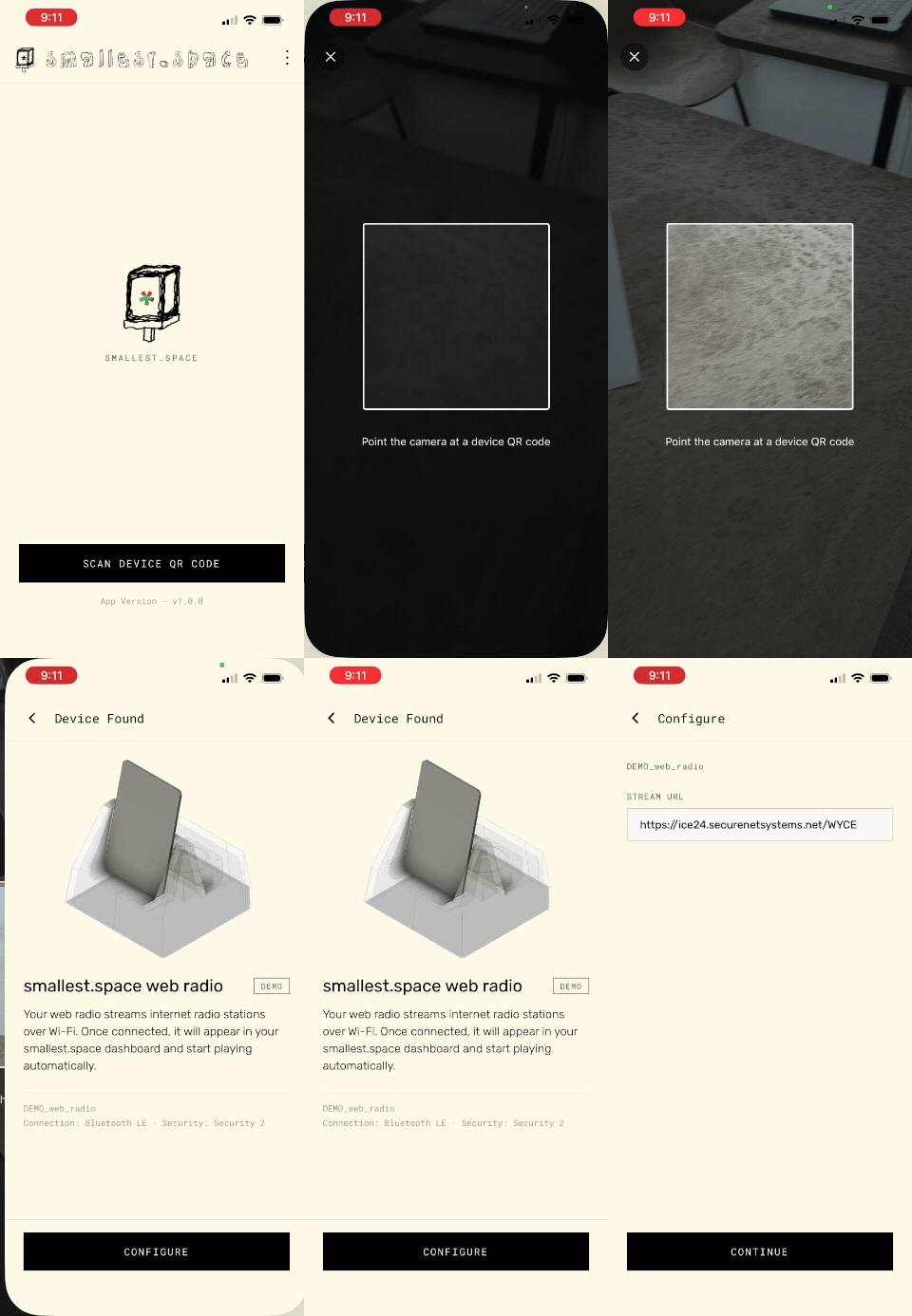
We have an iOS and Android app

We have a few ceramic PCB holder designs for slip casting

We have a electronic schematic and PCB layout for our audio circuit out for fabrication
Features
I decided on these features:
- Custom PCB should support streaming radio to either line-out via headphone jack and/or a small internal speaker for fun
- Android and iOS app - “vibe code” based on Espressif’s Android app, but use Expo to create React Native app that runs on both iOS and Android on single code base
- Actually release iOS and Android app to Apple App Store and Google Play Store
- Ceramic PCB mount
- Wood base for the Ceramic PCB mount… a base for the base I guess.
App
(the demo below is the video I sent to the Apple app store reviewers as they required a video with physical hardware showing the app working - not a very entertaining video but if you want to get an idea of how it works this shows it!)
I have very mixed feelings about AI. My identity as a software engineer is somewhat shattered, but this is not a blog post about that.
I figured I’d use Claude to my advantage on this project to do something I’ve wanted to do for a while but haven’t gotten around to - building a native iOS and Android app. Well, React native, but native as in app-store official native. I wanted the app to be simple but polished to let people using this device set things up without jumping through SoftAP hoops (as mentioned in the previous blog post). What this means in practice is that the device broadcasts itself through bluetooth, the app scans for local devices, and then the bluetooth connection is used to send WiFi credentials and other configuration values.
I wrote very very little actual code to accomplish this but spent somewhere around 8 hours over a weekend prompting Claude to do what I wanted. The app is actually quite simple relatively speaking, the main issues were getting the app setup using Expo (a framework for building React Native apps and integrating a few open source projects (including).
App stores
As of writing, the iOS App is live in the app store, the Android app is still pending. If you haven’t worked with these distribution systems before you might find the different ways they handle approval of the apps interesting.
The Apple approach is they have an actual person open your app and evaluate. I’m sure Apple isn’t paying a team of MIT graduates to spend a week testing my app or anything, but it was a real person because they actually messaged back and forth with me through the App Store Connect platform to request some additional information. They actually requested I record a full video, showing a physical device as well as the iOS app running on a real phone and working with the software (the same video I embedded above). I was actually impressed at this ask and appreciated it. After sending this video to them (which youtube analytics tells me they likely watched), the app was approved and went live. Total time was around 3-5 business days for this approval after I figured out how to actually build the app and upload it properly to the app store. You can see the app in the store here:

The Android store has less human involvement, and more of an automated system. The system works like this: You need to have at least 12 people test your app over a period of 14 days. I assume Google collects metrics about how many times your app was opened, how many times it was installed, how many minutes / hours it was used, etc. The number of updates to your app over this test period is also taken into account apparently. After this 14 day testing period you can apply to have your app released, and using some algorithm that isn’t entirely known Google approve or deny your app.
I believe I prefer the Apple approach to the review process, though neither is perfect. For Google, along with having friends and family install the app (I setup a demo mode you can see in the linked youtube video above so people could go through the provisioning flow without a physical device), I paid $15 bucks for a service of very professional testers (I’m sure!) to install and test your app. Speaking directly, this is effectively allows you to pay $15 bucks for what could very well be a system of bot phones to install your app and open it a few days a day, for 16 days, allowing you to meet the Google requirements without anybody actually using or testing your app. In my case it’s more of an insurance policy (and a friend actually got a bit of real feedback I believe from the service I’m using, so why not I guess).

This is the interface showing my app being tested by an elite team of Android QA engineers
Anyway, the actual Google Play app store listing looks like this:

The Google Play listing (won’t work at the time I’m posting this, but should in a few days!) is here.
Ceramic PCB holder
I went back and forth about between making a fully enclosed “case” for this project, or something that displayed the PCB. I landed somewhere in the middle but more on the PCB holder side of things. Here is one of several iterations that show the PCB holder with PCB, as well as a place to mount a small speaker. I decided it would be more fun to have a built-in speaker that allowed the device to have some functionality without plugging into an amp.

The thing that makes this process difficult is that ultimately I’m designing for a clay slip cast. Clay shrinks when fired and although I’ve done quite a bit of testing in the past to calculate my own rates for this shrinkage, it’s still imperfect. Additionally surfaces that are not well supported will sag during firing, so what might be a perfectly flat surface in a cad model might come out with a noticeable sag after firing.
This design is something I’m still iterating on. It’s been tricky for me to come up with something that meets all of these different criteria:
- Enough tolerance built in to allow M2.5 screws for mounting the PCB and speakers, taking into account where glaze is likely to pool (e.g. glaze reducing diameter of holes, so they need to be oversized)
- Enough space in the X/Y direction to allow the PCB to be mounted, considering #1, but also the likelihood that large flat surfaces are likely to warp some - currently I’m HOPING 2mm of space around the PCB + 5mm mounting holes is enough
- The ability to plug in a USB-C cable and 3.5mm audio cable inside the enclosure - this one is one of the trickier bits, without making a HUGE enclosure
- Account for places slip is likely to pool when glazing preventing access. In my CAD model I have a 4mm shell which is probably fairly accurate in terms of how thick the walls will be after slip casting, but because slip is very thick, the surface tension in small areas means the slip will be thicker and fill in these spaces. I need to try to account for this to make sure holes aren’t placed too close to edges that might not be accessible… this has lead to a larger than I had originally envisioned design

- Have a space, when I cast this in white porcelain, that I can write with an underglaze pencil a message. My current plan and the default station the firmware ships with is for our local WYCE 88.1 radio stream, so I’d like to be able to write, for example “WYCE”
- Look nice - I want the PCB to not be totally overpowered by the size of the base.

You can see in this shell version of the 3D print a rough idea of what this would look like when finished - but imagine the tighter spaces being rounder, with less access (note the small little nuts closer to the top - this the main area I’m worried about being able to get to).
The design has continued to get bigger and bigger unfortunately, in large part because to plug in the USB-C and 3.5mm cable I need enough room in the base for the cables to be able to bend 90 degrees to route them towards the back. I’m certain if I try to minimize the size / workable space too much I’ll end up regretting it, hence the much larger design I’ve decided on (for now). Hopefully even this isn’t still too small.
I think I’ll also make a walnut or maple base to set the entire thing into and give it a more polished / finished look.
Electronics and PCB

The ceramic holder design served as a good starting point as it told me the dimensions of the PCB and hole placement. There was some iteration between the ceramic design and PCB design, but the size and hole placement MUST be aligned between the two.
This was of course a very large part of this project. Probably the most difficult / time consuming part, largely because every time I come back to a electronics project I have to relearn the software, electrical engineering concepts, etc. Luckily I’ve done this a few times so it was a bit faster this time, but the software I use for designing the PCBs (KiCad, which I absolutely love) had a major version update, and I also decided to try a different way of handling libraries.
Along with the practical things I of course had to actually design the board which included deciding what it should actually do and which parts I should use for doing all of the audio “stuff”. I am not trying to reinvent the wheel, at least not complete, so I always look for popular parts that I can find examples / documentation / tutorials for. If there is a part that Adafruit uses that’s the ideal situation because they open source their designs, which means I can use their designs as a reference and sanity check along with the IC’s datasheet. I knew I wanted to support some sort of small speaker, and I knew I wanted line-out through a 3.5mm jack, and when I saw the TLV320DAC3100 was used by Adafruit in one of their breakout boards I decided that would be perfect.
What followed is around 3 or so days worth of work relearning KiCad and designing this PCB:


(note two of the above screenshots show v0.0.2 - this is not accurate really, but after I send a design to be manufactured I archive it to “freeze” the design then bump the revision for the next version - I just happened to take these screenshots after I had bumped the version number, but before making any changes, so other than the silkscreen showing v0.0.2 instead of v0.0.1, this is the exact layout that I sent to fabricate)
Here is a PDF of the schematic if you want, or an image version:

After the design was complete (I’m sure there will be bugs and I’ll have to fix and do at least one more revision of the board), I ordered a bunch of missing parts from Digikey and send the board for fabrication with JLCPCB. I’ll solder this with a hot plate and I also ordered a stencil for applying solder paste. I’m always shocked at how affordable it is to have the PCB made (roughly $15 shipped for 5 of them) - the PCB will be, strangely I think, the cheapest part of this project.
Small new things
There are three voltages on this board - 3.3V, 1.8V, and 5V. This doesn’t really matter, but was a slight pain for routing.
The bigger pain for routing was the pin pitch on the TLV320DAC3100 is, for me, very small. There are also a LOT of places that decoupling capacitors are recommended (every place you have power input). I’m not an expert (on anything I do really), but the general idea with decoupling capacitors is that they act a bit like shock absorbers that handle noise on the power line(s). The physical placement of these shock absorbers matters, they should be as physically close to the input into the chip as possible. As a result, you’ll notice there is a LOT of open space on the PCB, but then a lot of relatively dense component placement around the TLV320.
I care about the look of the PCB, but honestly this one doesn’t look too great IMHO. Going to be (relatively!) vast stretches of open space on the board, then weird clumps. I also swapped for the first time ever to 0603 passive components for the capacitors around the audio chip to make things slightly easier.
The other new thing I’m doing is storing all of my customer footprints (the physical part layouts) in git. Previously (and I’m not certain this isn’t still the best way to do things), I had all of my files stored in Google Drive and mapped to my local computer. This, to me, made sense because the files are not really useful to look at in version control, and it was easier to add a library from a mapped Google Drive folder than adding a git sub-module (or go the path of a monorepo or whatever). That said, putting everything in a single git repository seems to be well supported these days and I spent a bit more time as I got into KiCad 10 to figure out what some of the metadata files that KiCad supports that let you map in libraries which made the setup fairly elegant and simple. We’ll see how this goes, but this will make things more self-contained which will help the next time I pick up a project after months away.
Firmware
This post is long enough already, but I want to at least mention that the firmware for the device is largely untested as I don’t have a way to test the audio chip (the TLV320DAC3100). That said, in order to get the iOS / Android app working I had to integrate Espressif’s provisioning logic into the firmware, and I also wanted to at least do a PoC to make sure I could stream audio from my chosen WYCE web stream. I will be using I2S (and I2C!) for sending the audio data to the TLV320DAC3100, so I knew it would probably make sense to use Espressif’s own esp-adf.
I also had Claude rewrite the Adafruit TLV320DAC3100 C++ library to work with the Espressif’s IDF (their framework for writing firmware for the ESP32). This library is as of now untested, but lives on github at kevin-mitchell/tlv320dac3100-esp-idf.
In the end, the firmware is a cobbled together version of existing projects I’ve worked on, integrated with ESP-ADF, the rewritten (and untested) TLV320 library, and Espressif’s provisioning tools. I’m sure there will be more work once I’ve got the first board prototype back.
Next steps
So that’s about it for now. Next steps are:
PCB
- Get the PCB and parts and actually populate and solder the first PCB
- Test the board for simple things like power
- Test the firmware on the board
Ceramic holder
- Another iteration or two to see if I can refine the design a bit more to make it sleeker and a better match in size and weight to the PCB
- 3D print a mold and finish the surface with bondo
- Design a jig to help me cut the holes and other features I need to out of the casting
- Create a plaster mold of the shape and let it dry (a week at least for this)
- Pour the first slip casting
- Finish, bisque fire, and glaze fire the first version
Then put it all together and see if it works. Which it won’t, probably. Both the clay bits and the electronics are really slow to iterate, probably a month for the ceramic bit between making a mold, letting it dry, casting the mold, letting that dry, then having enough things to fire that it’s not a waste. So I’m really hoping I get the design of the ceramic bit right the first time.
Thanks for reading!